We’re Built for
the Big Leagues


Super Bowl ads, Black Friday, flash sales — will your platform hold under pressure? Simulate real-world traffic, prevent crashes, and be prepared for the biggest traffic events.
4.8




Even the best e-commerce platforms can break under pressure. Without
proper performance
testing, you’re gambling with every sale.

Black Friday, Cyber Monday, viral TikToks, or a multimillion Super Bowl ad — High sales events are great for business and terrible for an untested backend.
Without load testing, even a modest traffic spike can crash your store, freeze carts, and wipe out revenue in minutes.

The most fragile point in your funnel is also the most expensive.
If your site slows down when too many users try to check out, they’ll bounce — and they won’t come back. High response times, failed payments, spinning loaders: all avoidable with performance testing.

You pushed the update. Nobody tested it. Now nothing works.
A small code change or new plugin can overload your system in ways you didn’t predict. Performance testing ensures every update is safe — before your customers find the bugs for you.
Your store says “In Stock” — but your warehouse knows better.
When traffic climbs, backend systems like inventory and ERP can fall out of sync. That means customers buy items you don’t have, orders get canceled, and unnecessary strain on your operations — unless your systems are ready for real demand.

Your platform might be fast — but what about your integrations?
Most ecommerce setups rely on third-party services: payment providers, shipping APIs, CRM tools. Under pressure, even one weak link can stall the whole experience. Load testing identifies these chokepoints before your customers do.

Your campaign worked — but not everywhere.
A performance bottleneck in a different region can silently sabotage your international customers. Without geo-based performance testing, you won’t know it’s broken until you’ve already lost the sale.
Black Friday, Cyber Monday, viral TikToks, or a multimillion Super Bowl ad — High sales events are great for business and terrible for an untested backend.
Without load testing, even a modest traffic spike can crash your store, freeze carts, and wipe out revenue in minutes.

The most fragile point in your funnel is also the most expensive.
If your site slows down when too many users try to check out, they’ll bounce — and they won’t come back. High response times, failed payments, spinning loaders: all avoidable with performance testing.

You pushed the update. Nobody tested it. Now nothing works.
A small code change or new plugin can overload your system in ways you didn’t predict. Perfor-mance testing ensures every update is safe — before your customers find the bugs for you.

Your store says “In Stock” — but your warehouse knows better.
When traffic climbs, backend systems like inventory and ERP can fall out of sync. That means customers buy items you don’t have, orders get canceled, and unnecessary strain on your operations — unless your systems are ready for real demand.
Your platform might be fast — but what about your integrations?
Most ecommerce setups rely on third-party services: payment providers, shipping APIs, CRM tools. Under pressure, even one weak link can stall the whole experience. Load testing identifies these chokepoints before your customers do.
Your campaign worked — but not everywhere.
A performance bottleneck in a different region can silently sabotage your international customers. Without geo-based performance testing, you won’t know it’s broken until you’ve already lost the sale.
Neither should your performance test
FolderWave, Inc., a key digital services provider in Massachusetts, supports students in education planning. Collaborating with MEFA Pathway and College Board, they link numerous educational institutions. To tackle this issue, Bob Burke, president and co-founder, hired PFLB for performance testing.
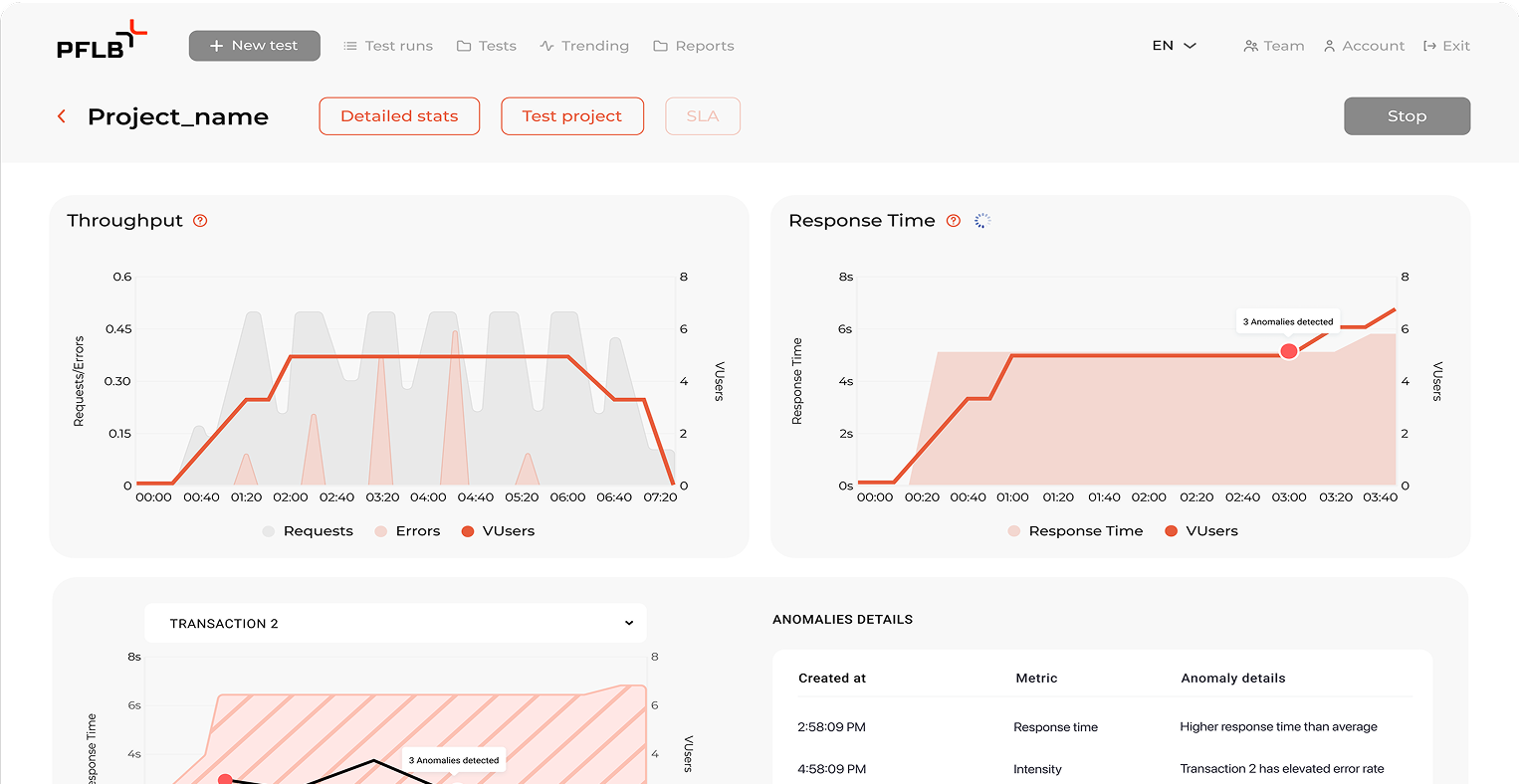



Let’s run a performance test and show you what’s working — and what needs fixing — before your next big sales event.
Four published case studies, each with the number that makes it evidence.
Absolutely. Our performance testing tools are built for both engineers and non-technical teams. With smart reports and AI-powered recommendations, you can test like a pro — even without a dedicated performance team.
We use enterprise-grade traffic simulation tools to mimic thousands (or hundreds of thousands) of users hitting your store at once — browsing, carting, checking out — just like they would during a real campaign or sales event.
Our software performance testing tools help you uncover backend bottlenecks, overloaded APIs, third-party failures, slow response times, and more — all before your customers ever experience them.
With our volume testing software and Quick Load Testing solution, we can launch a full test and deliver results in as little as 4 days — perfect for tight deadlines and high-stakes launches.
Website load testing tools are optimized for eCommerce flows — page loads, checkouts, product filters — while general software load testing tools might focus more on APIs or backend systems. We cover both, tailored to your specific needs.
The user journeys that carry the money, modelled as realistic traffic rather than a flat wall of user requests. That means product search, product pages, add to cart, shipping selection, payment gateways, order placement and order confirmation, mixed in the proportions your analytics actually show. Concurrent users are ramped to the level you expect and past it, because user behavior at peak is not the same as user behavior on a quiet Tuesday: people retry, they refresh, and they abandon.
From your own historical data. Last year's traffic patterns tell us the shape of Black Friday traffic and festive sales: when the peak traffic arrives, how steep it is, and what the maximum number of concurrent users was. Black Friday testing then runs three ways. A load test at the expected level, spike testing for the moment an email goes out and far more traffic arrives at once, and stress testing pushes past the target until we find the breaking point. Scalability testing answers the follow-up question: whether adding servers actually helps under increasing load, or whether something else is the ceiling.
Response times per journey step, error rates, throughput and resource utilization on the infrastructure. Page load time matters most where it converts: if a product page takes three seconds to load at peak instead of one, website speed is no longer a technical number, it is your conversion rate and the user experience your brand is judged on. We report page speed and loading speed next to the load that produced them, so test results read as cause and effect rather than a dashboard. When we analyze results, the question is always which step of the funnel degraded first and what user engagement it cost.
Rarely the web tier. In our engagements the first failure is usually slow database queries on search or inventory, third party dependencies that impose rate limits precisely when you need them most, or a content delivery network configured for average site performance rather than peak load. Performance issues at high traffic events rarely announce themselves: a site crash is the visible end of a chain that started earlier, and APM tools show the chain only if someone is watching system behavior while the load runs. That is why we correlate our numbers with your monitoring instead of reporting system performance in isolation, and why scalability issues get named rather than described.
Yes, as part of our load and performance testing services. Mobile users on constrained network conditions and shoppers in different locations see a different website performance from the one your office wifi shows, and Core Web Vitals are measured on real users, not on your staging box. A faster website makes a big difference to whether potential customers complete purchases: if the site takes long enough that people waste time waiting, they leave, and the whole process of acquiring them is spent. We measure what real customers would experience at peak so the fix lands before the traffic does.